Huji-Style Camera Filter
The warm, grainy, date-stamped look, applied to photos you have already taken.
No photo? Try a sample
Presets in this editor
Huji-Style
Loads automatically on this pageWarm flashed glow with grain, made for the corner date stamp.
The exact values this preset sets, so you can rebuild or tweak it by hand:
iPhone 4
Soft edges, gentle grain, slightly warm 2010s smartphone vibe.
Grain 38 · Softness 32 · Vignette 18
Warm Digicam
Golden-hour point-and-shoot warmth with punchy colors.
Grain 28 · Softness 18 · Warmth 66
Cool CCD
Cleaner, slightly cool vintage sensor feel (subtle green/cyan lean).
Grain 22 · Softness 14 · Aberration 12
Flash Pop
Harsh highlights + glow like a built-in flash at night.
Bloom 20 · Grain 18 · Contrast 60
Soft Nostalgia
Dreamy, faded, warm — heavy softness + bloom for a nostalgic vibe.
Softness 48 · Grain 30 · Bloom 26
2000s Y2K
Warm, faded early-digicam color with soft grain and a gentle vignette.
Grain 30 · Fade 18 · Softness 16
Disposable Flash
Hard close-flash glow, warm grain, casual single-use snapshot energy.
Grain 26 · Bloom 24 · Softness 12
Dazz-Style
Cool CCD glow with extra bloom and old-sensor color fringe.
Grain 22 · Bloom 14 · Aberration 13
Kodak Gold
Golden film warmth with soft skin tones and fine grain.
Grain 22 · Warmth 63 · Softness 12
35mm Film
Fine grain and restrained, true-to-life analog color.
Grain 25 · Softness 14 · Vignette 8
Film Grain
Fine, even film texture over otherwise natural color.
Grain 35 · Softness 10 · Fade 10
Lomo Punch
Dark toy-camera vignette with loud, punchy color.
Vignette 30 · Grain 23 · Saturation 62
Vintage Fade
Old-print warmth with lifted blacks and darkened corners.
Grain 28 · Fade 21 · Softness 20
Polaroid
Washed instant-film fade with gentle warmth and a soft glow.
Softness 22 · Fade 21 · Vignette 20
70s Print
Heavily faded amber print: washed-out blacks, low saturation, soft detail, dark corners.
Fade 30 · Grain 28 · Softness 26
80s Print
Faded drugstore-print colour: warm, pink-leaning, low contrast, soft grain.
Grain 32 · Fade 26 · Softness 24
90s Snapshot
Point-and-shoot flash, coarse film grain, punchy lab colour, neutral warmth.
Grain 34 · Bloom 18 · Softness 12
Matcha Latte
Soft matcha green: pale soft highlights, a green-olive cast, gentle haze, clean detail.
Tint 80 · Softness 22 · Grain 18
Frequently Asked Questions
No. This is an independent, browser-based tool that recreates the huji-style look (warm color, grain, light leaks, and the signature corner date stamp). It is not affiliated with the Huji app, and it works on photos you have already taken.
Yes, and that is the main reason to use a web tool. Upload any photo you already have, even an old one, and apply the look. The app version only works on photos you shoot inside it.
Turn on the date stamp, set a date, and it prints in the bottom-right in the classic orange dot-matrix font. Backdate it to whatever year you want the photo to feel from.
Start warm, add grain, lift the highlights a little for that flashed glow, and add the date stamp. Keep it slightly imperfect rather than clean.
No. It is free, with no sign-up and no watermark on your exports.
No. You can edit and download as many photos as you like, one after another, without paying or signing up. Everything happens on your device, so there is no quota.
No. Processing is local to your browser, so your photos stay private.
About This Tool
The huji-style look is one of the most recognizable in retro photography: warm color, a soft grain, a little flashed glow in the highlights, and an orange date stamp in the corner. The catch with the original app is that it only works on photos you shoot inside it. This page applies the look to photos you already have.
Upload any image, even an old one, and the Huji-Style preset is applied automatically. Add grain, lift the highlights for that close-flash glow, and turn on the date stamp to print the classic dot-matrix date in the bottom-right. That stamp is the single detail that makes the look read as huji rather than just "warm filter."
Keep it slightly imperfect. A bit of grain, a warm cast, and a backdated stamp will do more than any amount of fine-tuning. Set the date to a year that fits the memory and the photo feels like it was always that old.
This is an independent tool and is not affiliated with the Huji app. Everything runs in your browser with no upload, it works on phones and desktops, and it is free with no watermark on your exports.
See the difference
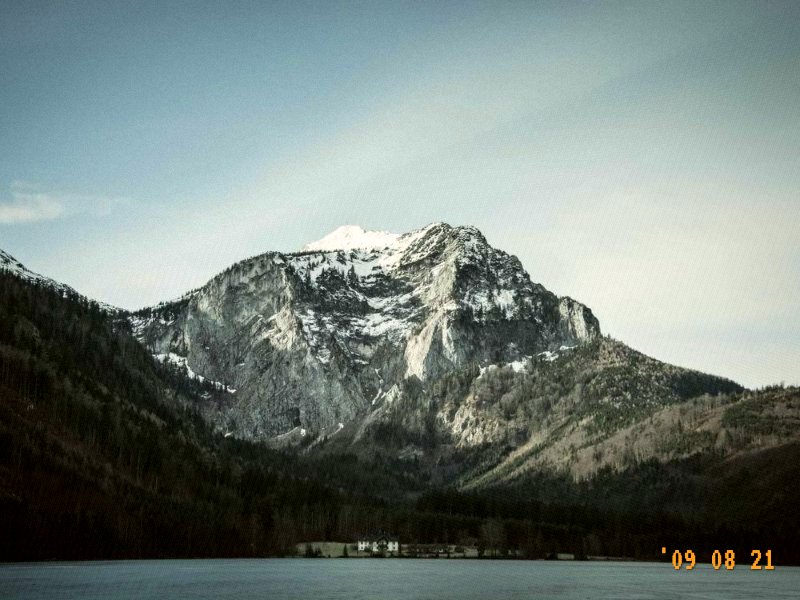
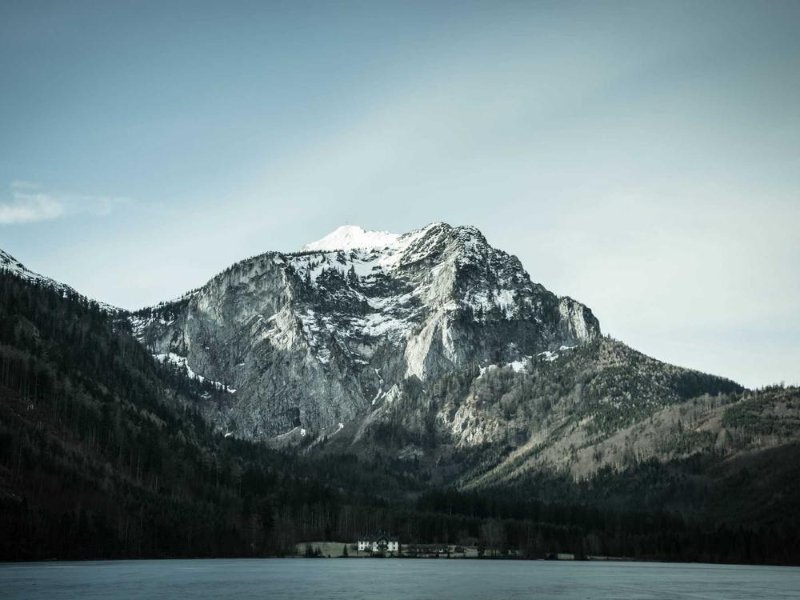
How to get the huji-style look
- 1
Upload an existing photo
Unlike the app, this works on photos you already have, even old ones. Nothing is uploaded.
- 2
Start from Huji-Style
The Huji-Style preset loads automatically, already warm with a flashed glow. Lift the highlights a little more if you want it hotter.
- 3
Add the date stamp, export
Turn on the date stamp and set a year. That orange corner date is the signature huji detail.
A huji-style recipe
Want to set it by hand? Keep it warm and slightly flashed, and do not skip the date stamp.
Huji-style vs the other looks
The huji-style look is warm with a flashed glow and a date stamp, close to the disposable look but a little softer. For a harder flash, try the disposable page; for cooler and cleaner, try CCD.
Huji Cam vs Dazz Cam: which one actually wins
The app this look comes from, next to its closest rival: the look, the limits, the price.
Try another look
Not after a whole look? You can also stamp a date on it or add a vignette. The rest are on the tool list.