How to make your photos look like an old digital camera
The early-digicam look is five small imperfections stacked together. Add them in the right order and a modern photo stops looking modern.
By Skyz, maker of DigicamFilter · Updated September 14, 2026
An old digital camera photo does not look bad by accident. It looks the way it does because of specific limits in those cameras, and you can reproduce every one of them on a modern photo. Once you know the five ingredients and the order to add them in, a clean phone shot starts looking like it came off a 2004 point-and-shoot in about a minute.
The five ingredients
- •Color that is slightly off: usually warmer, since old auto white balance rarely got it exactly right.
- •Lower dynamic range: highlights blow out and shadows block up sooner, which reads as contrast and mood.
- •Grain: a fine, even texture, instead of the smoothed, waxy look modern phones produce.
- •Flash glow: a hard, close on-camera flash for indoor and night shots.
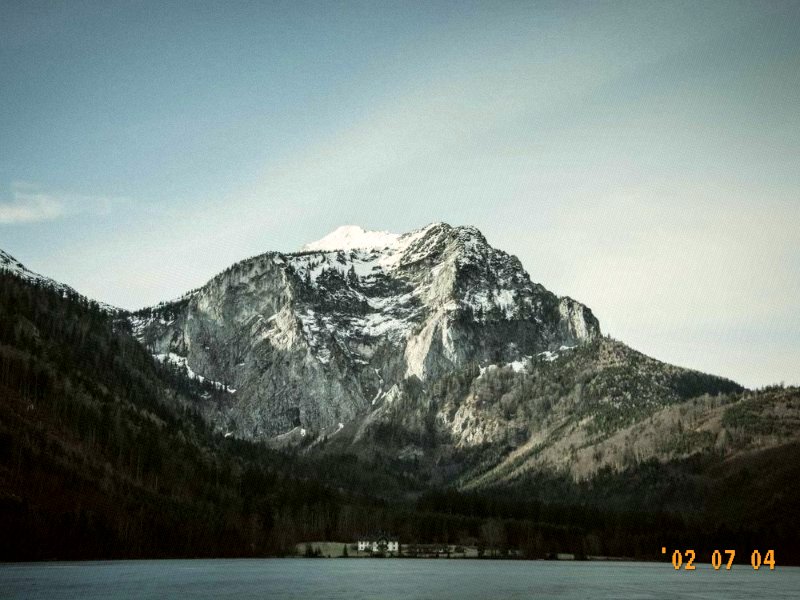
- •The date stamp: an orange dot-matrix date in the corner, the single biggest tell that a photo is "old".
Step by step
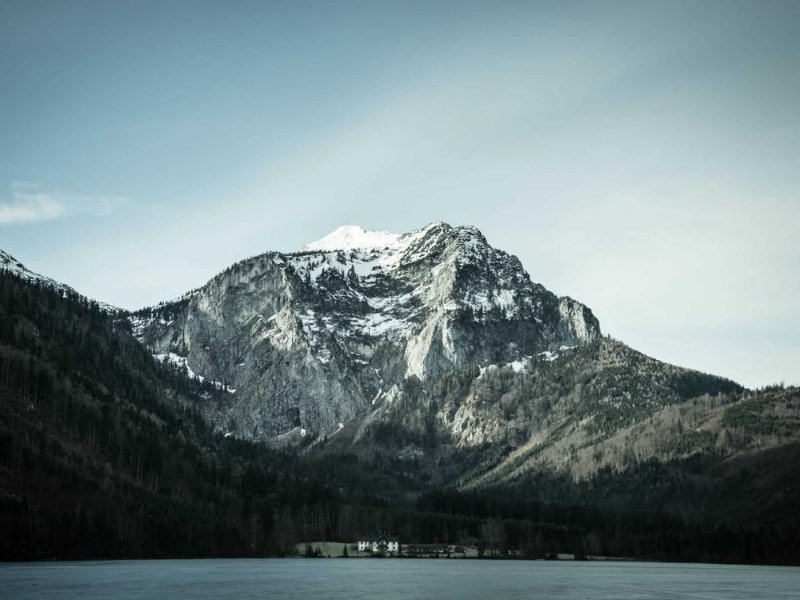
- 1Open the editor and upload a clean photo. You are adding character, so a sharp modern shot is the best raw material.
- 2Warm the color up and pull a little dynamic range out: raise contrast slightly and let the brightest areas push toward white.
- 3Add grain until the smooth phone texture breaks up. Low to mid values usually look right.
- 4For indoor or night photos, raise highlights and bloom a touch to fake the close flash.
- 5Turn on the date stamp and set the year you want the photo to feel from.
- 6Export at full size so the grain stays sharp.
A reliable starting recipe
Prefer numbers? Start here and adjust to the photo.
Starting points for specific cameras
A lot of people are not after "old camera" in general but one camera in particular, usually one they owned or keep seeing on their feed. This editor does not model any camera exactly, and nothing here is an official profile. What it can do is get close to the look people mean when they name one, starting from the nearest preset and moving a few sliders that work in every browser.
| Camera | What people are copying | Start from | Then adjust |
|---|---|---|---|
| Canon IXUS / PowerShot (Digital ELPH), mid-2000s | The classic CCD compact: warm, punchy colour and a bright built-in flash indoors | Warm Digicam | Fine as it comes. For flash photos take Contrast from 54 to about 58. |
| Sony Cyber-shot compacts such as the W800 | A budget CCD compact: cooler, cleaner colour and a harsh flash on faces | Cool CCD | Keep Warmth near 40–45; add Grain towards 26 if it looks too smooth. |
| Canon PowerShot G7 X | Not an old camera: a 1-inch-sensor compact from 2014 onwards, loved by vloggers. The look people copy is bright, flash-lit and warm, with clean skin | Flash Pop | Warmth up from 54 to 58–60, Grain down from 18 towards 10, Saturation from 55 to about 52. |
| Ricoh GR | A premium compact known for punchy high contrast, especially its contrasty black and white | 35mm Film | Contrast from 49 up to 58–62. For black and white, use the black and white converter and add Grain around 30. |
| Nikon Coolpix | Too many models across too many years to pin one look down | Cool CCD for older compact models, 2000s Camera Filter for a warmer result | Judge it against one of your own old photos rather than a description. |
If you still have files from the camera, open one next to your edit. Match the warmth first, then the contrast, then the grain, and stop as soon as the two sit together. Named-camera looks vary a lot between models, settings and light, so a real photo beats any recipe, this one included.
Match the era you actually want
| Era | Character | Start here |
|---|---|---|
| Late 1990s to mid 2000s | Warm, faded, soft | 2000s Camera Filter |
| CCD compacts, mid to late 2000s | Cool, glowing, punchy | CCD Filter |
| Disposable film, any era | Hard flash, high contrast | Disposable Camera Filter |
| Old-camera keepsake | Warm with a date stamp | Vintage Camera Filter |
If you only do one thing, add the date stamp and backdate it. Nothing else signals "old photo" as instantly. Set it to the year that fits the memory and the image stops looking like a filter.
Common mistakes
- •Over-saturating. Old cameras were punchy, not neon. If skin turns orange, pull warmth and saturation back.
- •Too much blur. Soften the edges a little, but do not smear the photo. Grain reads as old, mush reads as broken.
- •Forgetting the date stamp. It is the highest-impact, lowest-effort detail.
- •Exporting too small. Downscaling hard can crush the grain and flatten the effect.
Upload a photo and build the old-camera look step by step. Free, in your browser, no uploads.
Frequently Asked Questions
Add the imperfections old cameras had: warm or slightly-off color, lower dynamic range, a fine grain, a hard flash for night shots, and a date stamp. Add them in that order on a clean photo and keep each one subtle.
Pick the year you want the photo to feel from. For the early digital camera look, somewhere between 1999 and 2007 fits the aesthetic most people are after.
They do not look better technically. They look more characterful. Phones smooth and correct everything, while old cameras left in bloom, grain, and color quirks that the eye reads as real and nostalgic.
Yes. The editor is free with no sign-up and no watermark, and every edit happens in your browser, so your photos are never uploaded.
You can get close, not exact. The table above gives a starting preset and a few slider changes for the cameras people ask about most. None of them is an official camera profile, so the best check is one of your own photos from that camera, if you have one.